From chat box to research workflow
Most people meet AI as a chat box: type a question, get an answer, copy the useful part somewhere else. That is fine for quick tasks. It is too small a mental model for research.
The under-discussed part is local and lower-cost LLMs. The public conversation is mostly about ChatGPT, Claude, Gemini, and whatever model is winning the leaderboard this week. Those models matter. I use them. But capable AI is no longer only something you rent from a chat website.
For example, Gemma 4 26B A4B and Qwen 3.6 35B A3B are relatively small by frontier-model standards. Yet in public benchmark comparisons, they can sit near last-generation flagship systems like ChatGPT-4o and Claude Opus 4, and sometimes beat them on particular tasks. That does not make them magic. It does mean the laptop model is not just a toy for summarizing grocery lists.
That is the main idea of this post: do not think of AI only as a website you visit. Think of it as a model you can route into your research workspace. Sometimes the model is local. Sometimes it is Claude. Sometimes it is a cheaper API model. The workflow can stay the same.
Research work is folder-shaped. There are notes, PDFs, scripts, datasets, citations, logs, drafts, screenshots, and half-finished ideas with names like final_really_final_v3. A chat box can help, but it usually sits outside the work. A harness brings the model into the project.
My setup uses fast local models for small jobs, stronger remote models for harder jobs, a coding harness to keep work organized, MCP tools when the agent needs a browser, skills for research habits I repeat, and Git so mistakes are reversible.
This post explains that setup in plain English. The target reader is an economist, policy researcher, graduate student, or curious person who wants to use AI for real work without becoming a full-time AI engineer.
AI words used here
AI writing gets messy fast because the vocabulary sounds like a small conference badge collection. Here are the terms I use in this post.
Local model: An AI model that runs on your own computer instead of a company server. It is useful for private notes, offline work, and cheap repeated tasks.
LLM: Short for large language model. This is the kind of AI system behind tools like ChatGPT, Claude, and many local models. It predicts and generates text, code, and structured output based on patterns learned from large amounts of data.
Quantization: A way to store a model in a smaller numerical format. A model that is too large in full precision may fit on a laptop in 4-bit or 5-bit form. The tradeoff is some accuracy; the gain is that it runs.
MoE: Short for mixture of experts. The model has many internal expert parts, but uses only some of them for each token. That can make it faster than a dense model of similar total size.
Harness: The program around the model. A chat box only answers. A harness gives the model a workspace where it can inspect files, edit code, run commands, and use tools.
Vibe coding: Describing what you want in natural language and letting an AI write, edit, run, and debug code with you. It does not mean you stop thinking. It means you move from typing every line yourself to directing the work and checking the result.
MCP: Short for Model Context Protocol. MCP is a standard way for AI tools to connect to other tools and data sources. Plain English version: MCP gives the model hands.
Skills: Reusable instruction packets. A skill tells the agent how to do a repeated kind of work, such as checking citations, cleaning data, or revising prose in your preferred style. If MCP gives the model hands, skills give it habits.
Git: Version control. It lets you save checkpoints and go back when something breaks. Before letting AI edit a real project, make the project easy to undo.
The stack
The stack in this post is simple:
- A local model handles fast, private, offline work.
- A frontier model handles tasks that need stronger reasoning.
- A harness gives the model access to the project.
- MCP gives the model tools, especially a browser.
- Skills give the model reusable research habits.
- Git keeps the work recoverable.
The stack matters because research is cumulative. A chat box forgets the project shape. A harness can work inside the folder where your paper, code, data, logs, screenshots, and notes already live.
Start with the machine you already have
If you use an Apple Silicon MacBook, meaning M1 or newer, you already have a surprisingly good local AI machine.
The reason is unified memory. On many desktops, the CPU has system RAM and the GPU has separate VRAM. If your graphics card has 32 GB of VRAM, then 32 GB is the hard limit for what the GPU can hold. Apple Silicon is different. The CPU and GPU share one memory pool, which Apple lists as unified memory in its Mac specs. A MacBook with 36 GB or 48 GB of unified memory can use that memory more flexibly for local model inference.
I have a MacBook with 48 GB of RAM. Two models I have used extensively are especially interesting:
The key words are quantization and MoE. Quantization helps the model fit. MoE helps the model move faster. For everyday work, speed matters. The difference between 20 tokens per second and 60 tokens per second is the difference between “I will wait” and “I will actually use this all day.”
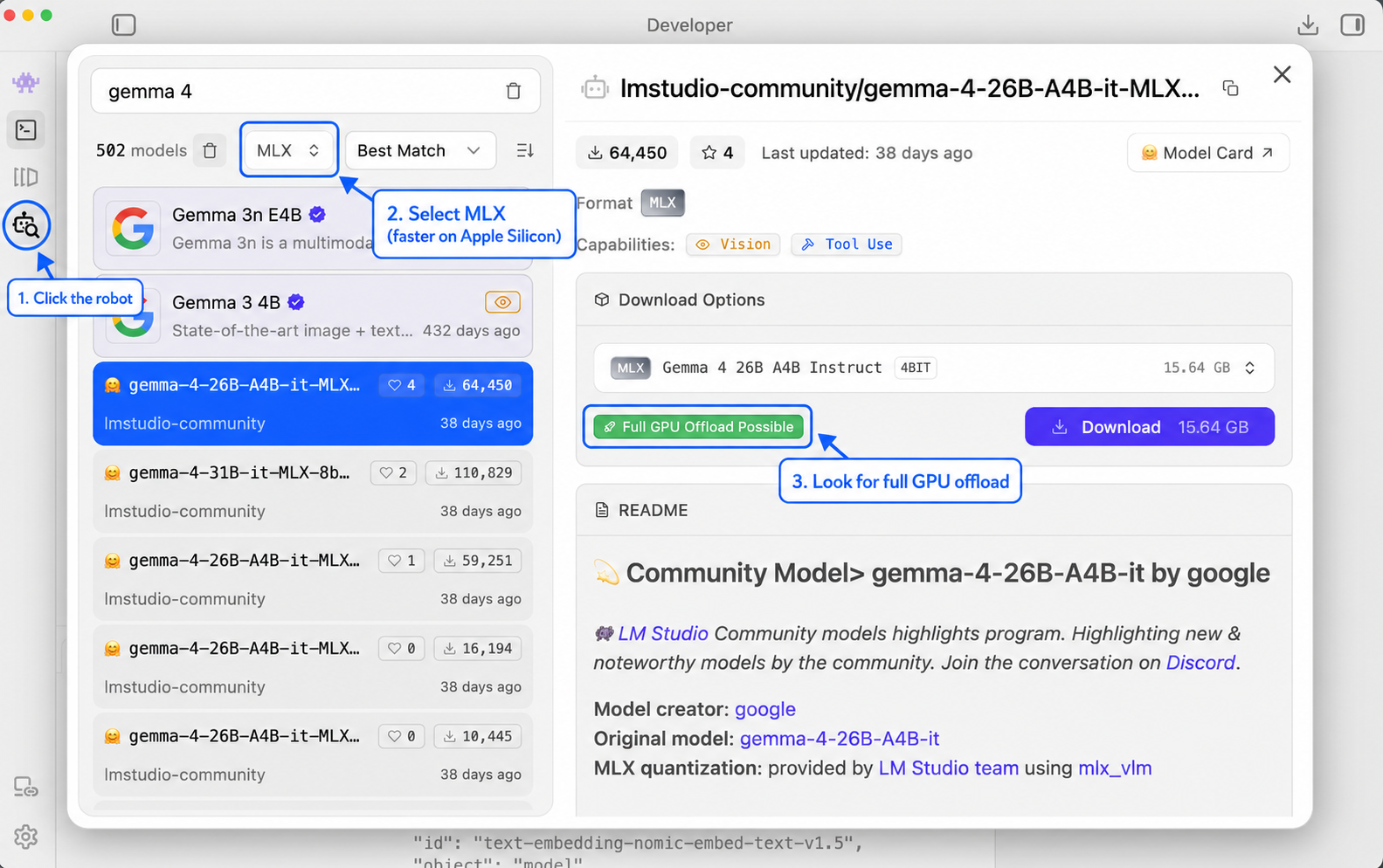
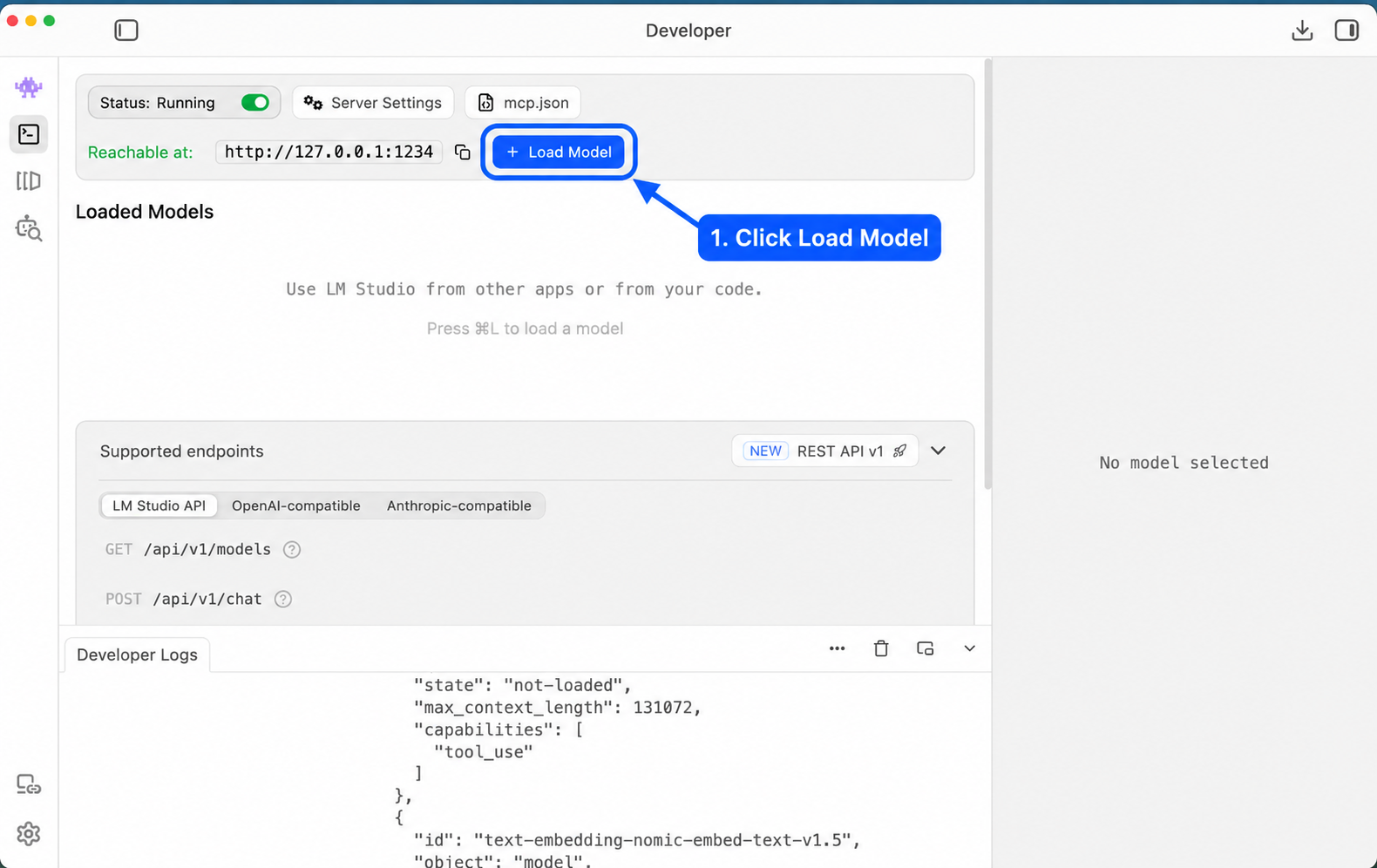
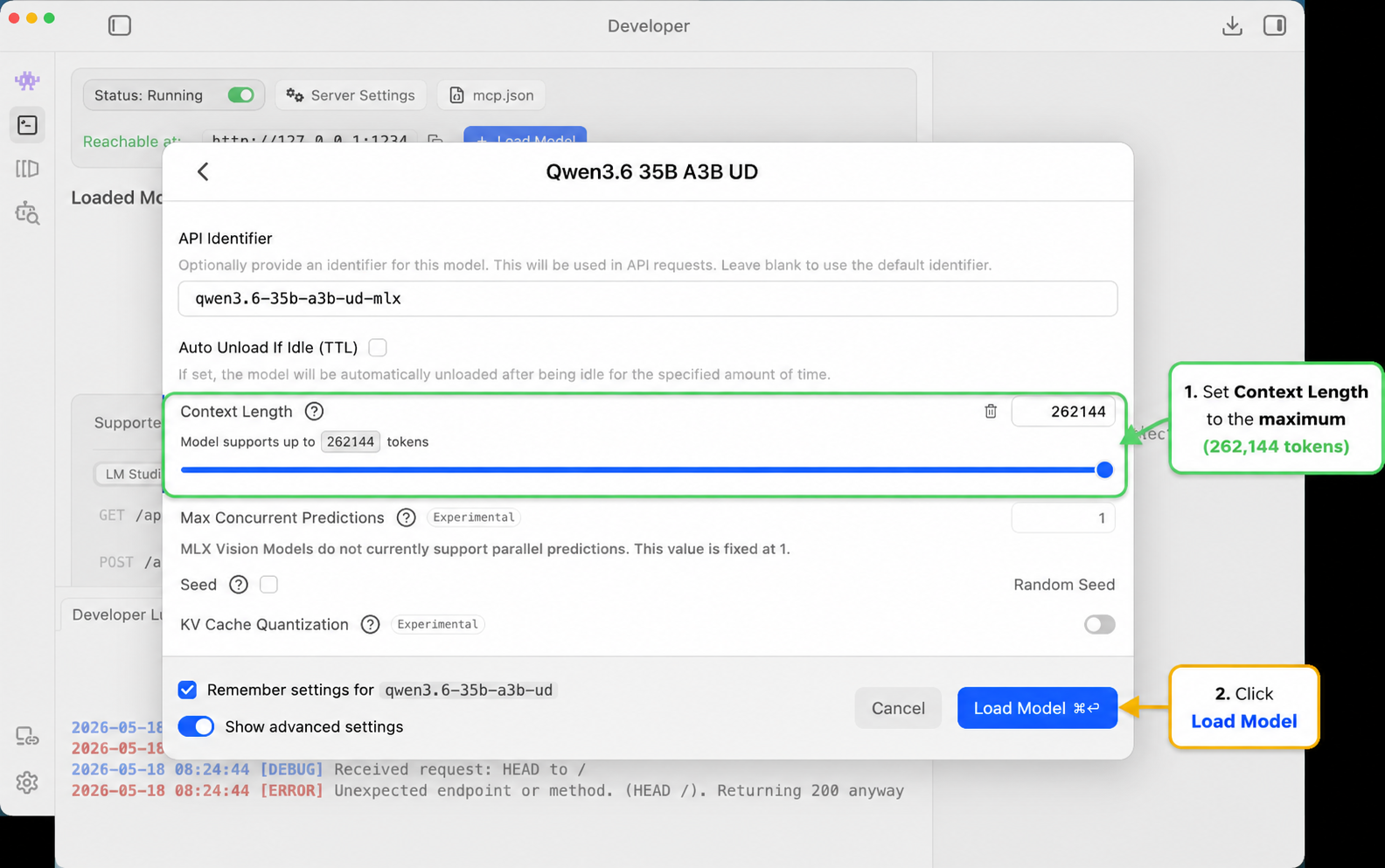
I usually recommend installing local models through LM Studio. It gives you a simple app, a model browser, and a local server. Ollama can do similar work, but MLX support is currently easiest for me through LM Studio.
Benchmarks are not the whole story, but they explain why this is worth trying. This llm-stats comparison puts Gemma 4 26B A4B and Qwen 3.6 35B A3B next to ChatGPT-4o and Claude Opus 4. I read comparisons like that as permission to use local models for routine work, not proof that they replace frontier systems.
The best frontier systems are still better for many hard tasks. The practical point is smaller: the gap is now narrow enough that a local model can become part of your daily research setup.
Local models are especially useful when the task is:
- Editing short text
- Fixing short blocks of code
- Cleaning notes
- Drafting small scripts
- Working with private notes
- Working on a plane or anywhere without internet
The private notes point matters. If you use a system like Obsidian to manage your life or write journals, you may not want every thought sent to an online service. A local model gives you a useful private workspace.
The point is not to become a local-model purist. It is to have another gear. Sometimes you need the strongest model available. Sometimes you need the model that is already running on your laptop.
Put the model inside a harness
Running a local model is only half the trick. The other half is putting it somewhere useful.
Claude Code is one example of a harness. Claude Code is not itself the language model. It is the structure around the model. It lets the model inspect files, edit code, run commands, use tools, and keep track of a project.
I also use Cline with local LLMs. I find Cline useful with smaller models because the VS Code workflow feels natural.
Plain English version:
A chatbot answers you. A harness lets the model work inside the project.
This is what makes vibe coding useful. You are no longer asking a chatbot for advice and then copying answers by hand. You are letting an agent work inside the folder where the project already lives. You still inspect the result. You still own the judgment. The model just gets to stop being a very confident autocomplete trapped in a text box.
For local models, LM Studio documents this directly in its Claude Code integration guide. The key idea is that LM Studio can expose an Anthropic-compatible endpoint on your own machine.
My main interest is using this inside VS Code because that is where most of my code lives.
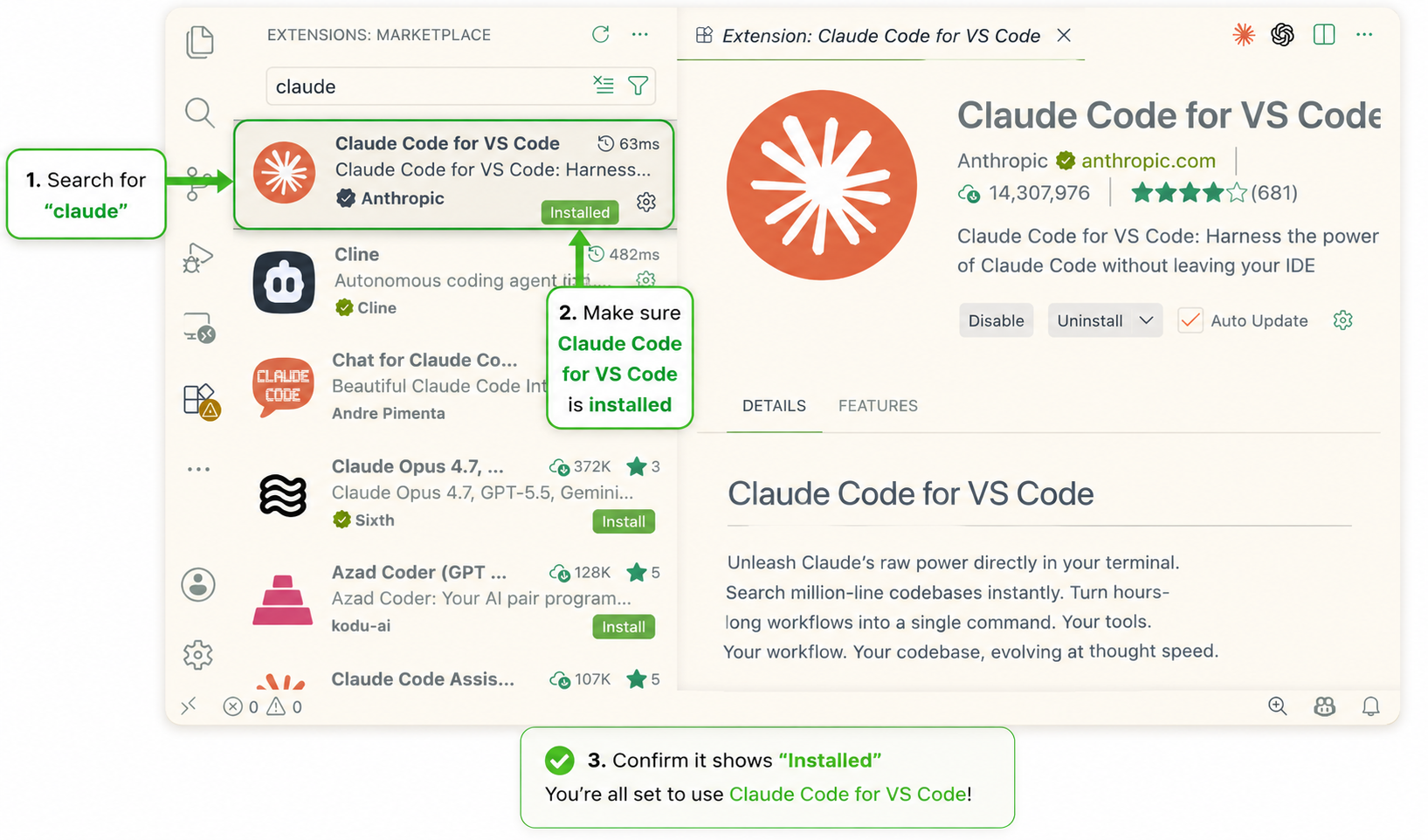
First, make sure the Claude Code extension is installed and enabled.
Then open your user settings.
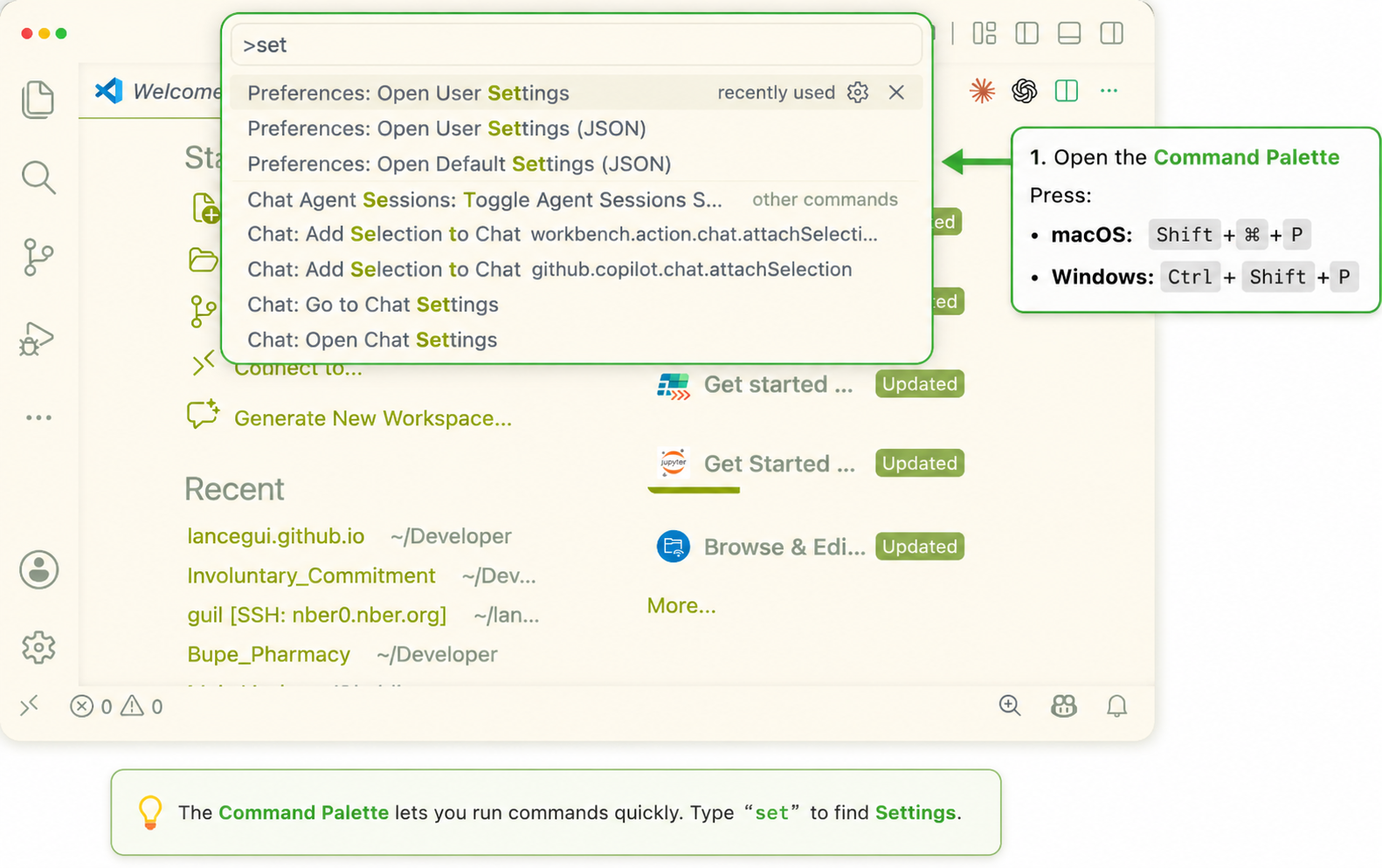
Shift + Command + P and search for settings.
Add this block to VS Code settings.json:
"claudeCode.environmentVariables": [
{ "name": "ANTHROPIC_BASE_URL", "value": "http://localhost:1234" },
{ "name": "ANTHROPIC_AUTH_TOKEN", "value": "lmstudio" }
]
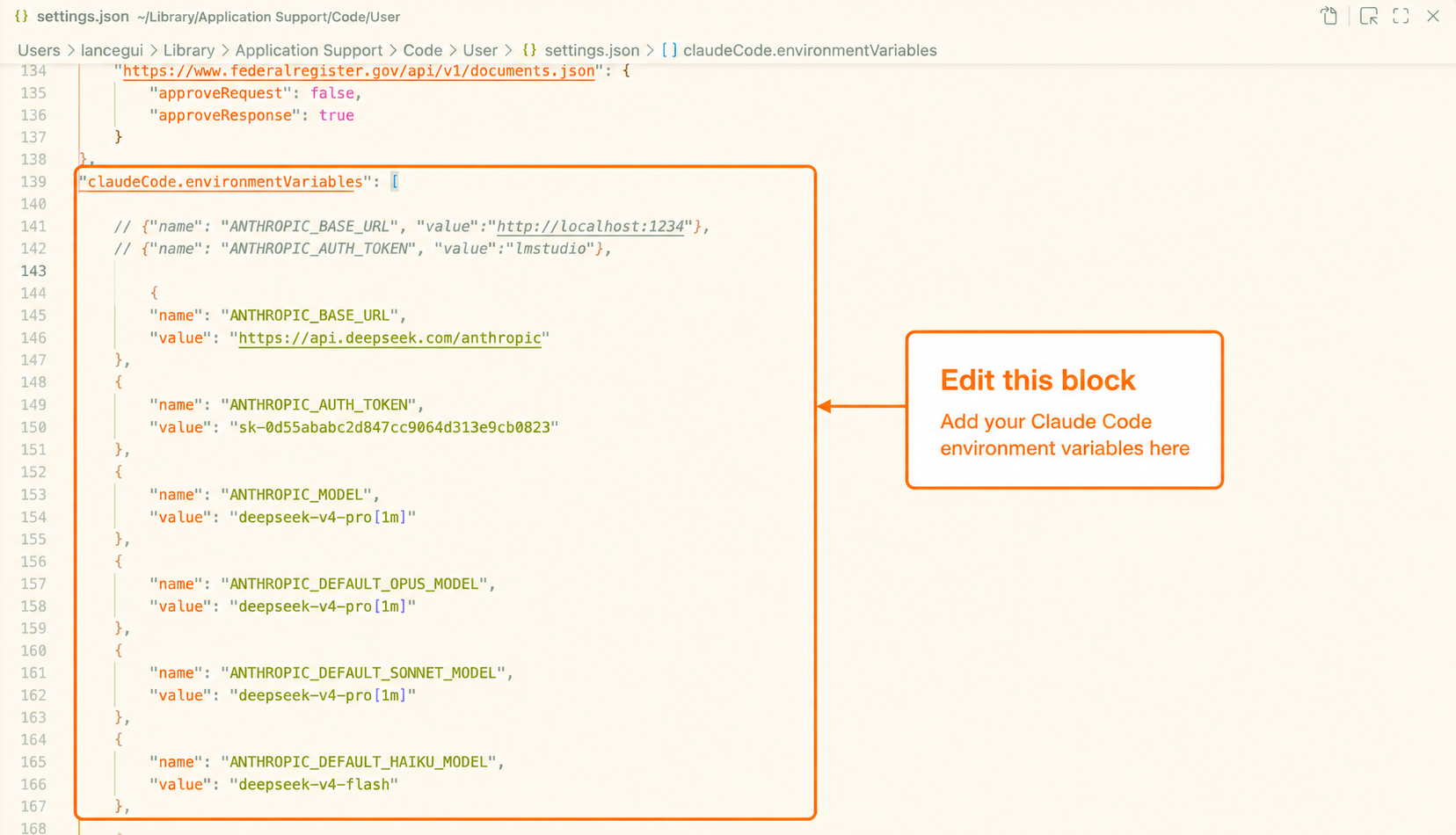
Restart VS Code after changing the settings.
Now Claude Code is working inside your VS Code project, but the model can be local. It is not magic. It is plumbing. A lot of applied AI is getting the plumbing right.
Keep the model swappable
Once you organize the work around a harness, the model becomes more swappable.
You can use:
- A local model for cheap, private, offline tasks
- Claude for difficult coding and long-context reasoning
- DeepSeek or another lower-cost API model when price matters
This is one of the most important practical lessons: do not marry one model. Build a workflow where different models can plug into the same research environment.
That is why the harness matters so much. Once the agent workflow is set up, you can often swap the engine underneath it. Claude Code does not have to mean “only use Claude for everything.” Cline does not have to mean “only use one local model.” The harness gives you the workflow; the model supplies the reasoning. For some jobs, a cheaper model inside the right harness feels much closer to the expensive experience than people expect.
The same logic applies to harnesses. Cline has a natural flow inside VS Code. Hermes Agent can learn from past behavior. Claude Code has convenient built-in features like web retrieval and web search. I do not expect one tool to win forever. I want the workflow to stay modular.
Sometimes I want the best model I can get. Sometimes I want a cheaper model because I am scraping many pages. Sometimes I want a local model because I am offline. The harness makes those choices less painful.
Here is the pattern for routing Claude Code to a different compatible API endpoint:
"claudeCode.environmentVariables": [
{
"name": "ANTHROPIC_BASE_URL",
"value": "https://api.deepseek.com/anthropic"
},
{
"name": "ANTHROPIC_AUTH_TOKEN",
"value": "YOUR API KEY"
},
{
"name": "ANTHROPIC_MODEL",
"value": "deepseek-v4-pro[1m]"
},
{
"name": "ANTHROPIC_DEFAULT_OPUS_MODEL",
"value": "deepseek-v4-pro[1m]"
},
{
"name": "ANTHROPIC_DEFAULT_SONNET_MODEL",
"value": "deepseek-v4-pro[1m]"
},
{
"name": "ANTHROPIC_DEFAULT_HAIKU_MODEL",
"value": "deepseek-v4-flash"
},
{
"name": "CLAUDE_CODE_SUBAGENT_MODEL",
"value": "deepseek-v4-flash"
},
{
"name": "CLAUDE_CODE_EFFORT_LEVEL",
"value": "max"
}
]
You can see the pattern. To make Claude Code run on something other than Anthropic’s models, you point it to another compatible endpoint and set the model names.
One issue I noticed: web search may not work the same way with DeepSeek. One workaround is to give Claude Code this gist and ask it to implement the web-search bridge: arbipher/f959c14de7a9e09c78a2b162bc6f1ec9. Modern LLMs are good enough that you often do not need to fully understand every detail of the workaround. You still need to verify that it works.
Add tools with MCP
MCP is useful because many research tasks require the agent to do something outside the chat box.
One MCP I find especially useful is microsoft/playwright-mcp. Playwright is a browser automation tool. With Playwright MCP, an agent can open a browser, click buttons, fill forms, and inspect pages.
This matters because many websites are not simple static HTML pages. Some require clicks, search boxes, login flows, or JavaScript. A browser-controlling agent can often handle sites that a simple scraper cannot. It should still respect logins, terms of service, and access rules.
Copy-paste install for Claude Code:
claude mcp add playwright npx @playwright/mcp@latest
Or you can ask Claude Code to install microsoft/playwright-mcp for you. This is a good example of vibe coding: you do not always need to remember the exact command if the agent can look up and apply the setup.
After restarting Claude Code, ask:
Use playwright to navigate to https://example.com and tell me the page title.
If that works, the agent has a browser tool.
This becomes extremely convenient for web scraping. You do not need to manually find every button or inspect every element. If you have worked with Selenium before, you know how annoying it can be to figure out which button maps to which script. Now the LLM can often operate the browser directly.
This also changes search. Scraping no longer has to rely only on keyword matching. The model can use text understanding while it navigates. That is especially useful when searching through legal statutes, where the same idea may be described in different words across states.
Add habits with skills
Skills are different from MCP tools. A skill is a reusable instruction packet. It tells the agent how to do a repeated kind of work.
For example, a skill could say:
- How to scrape laws
- How to write an economics-style literature review
- How to check citations
- How to clean a dataset
- How to prepare a replication package
- How to revise prose using Deirdre McCloskey’s Economical Writing principles
Skills are useful because LLMs handle bounded tasks better than sprawling projects. Give a model one clear job and it can be amazing. Ask it to maintain a complex research project over many hours and it starts to drift. It forgets constraints. It repeats itself. It changes the plan.
The risk grows after the conversation fills the context window and the system has to compact the memory. Context is what makes the model smart about your specific task. When that context is compressed, some details survive and some do not.
So I try to make the plan explicit before the model starts doing serious work. I use a planning skill in my own setup, and I recommend studying public skill collections like addyosmani/agent-skills. There are skills for planning, testing, Git workflows, visual review, and parallel agents. obra/superpowers has a similar spirit. You can use both styles at the same time.
Git is worth mentioning again here, even for non-technical readers. Git is version control. It lets you save checkpoints and go back when something breaks. The important idea is simple: before letting an AI edit a project, make it easy to undo the edits. That is better than trusting a rewind button in a chat app.
Skills also make parallel agents more useful. Instead of one model slowly doing everything, you can send smaller jobs to multiple agents: one checks sources, one writes a scraper, one reviews output, one drafts documentation. This can be powerful, but it can also burn through your subscription or API budget very quickly.
Of course, you can make your own skill. I made one using Anthropic’s /create-skill flow. After a few iterations, it became a comfortable place to edit my writing. It pushes for active voice, avoids excessive em dashes, checks logic, and follows some of the economics writing habits I care about. I keep the current version here: lancegui/economic-editor-skills.
Skills usually live as folders with a SKILL.md file. A simple skill has:
my-skill/
SKILL.md
The skill file explains when to use the skill and what steps to follow. The important part is not that the file is fancy. It is that the file captures repeated judgment. A good writing skill can remember your preferred style, common mistakes, revision principles, and examples of writing you think works well.
That looks simple, but it matters. You are turning repeated judgment into reusable infrastructure.
Watch the cost
Once you add MCP, browser automation, skills, and parallel agents, AI can get expensive fast.
I once burned through a five-hour Claude Pro session in about ten minutes by scraping websites and running agents in parallel. That is funny once. It is less funny if it becomes your research workflow.
There are three ways to handle this:
- Pay for a larger subscription.
- Use pay-as-you-go APIs.
- Route cheaper tasks to cheaper or local models.
The third option is the most interesting. Use the expensive frontier model for the parts that need judgment. Use local or cheaper models for repetitive parts: page extraction, cleaning, first-pass classification, logging, formatting, and sanity checks.
The rule of thumb is simple:
Spend frontier-model attention where judgment matters. Spend cheap-model attention where repetition matters.
Use case: scraping laws
The place where all of this comes together for me is legal and policy data.
Economists often need datasets that do not exist yet. Suppose you want to study a law across states. The hard part is often not the regression. The hard part is building the dataset:
- Which states have the law?
- When did the law pass?
- When did it take effect?
- What exact statutory text changed?
- Which definitions matter?
- Are there thresholds, exemptions, or sunset dates?
- Did later amendments change the treatment?
This is exactly where AI helps, but only if used carefully.
My preferred workflow looks like this:
- Use a planning skill,
/agent-skills, or/superpowersto create a plan. - Design the schema before scraping: variables, enactment dates, effective dates, legal definitions, petitions, exemptions, and sources.
- Tell the agent to use Git before editing code or data files.
- Save the plan locally. If the agent does not save it, explicitly ask it to create a plan file.
- Run the workflow on a few states first.
- Review the output and revise the plan. Some laws will not look like what you expected.
- Use parallel agents only after the pilot looks reasonable.
- Use Playwright MCP when ordinary scraping gets stuck on browser interactions.
- Ask the agent to write a summary of what it found, what failed, and what still needs human review.
- Repeat until the dataset is good enough to audit.
There will be problems. In web scraping, there are always problems. Browsers fail, pages change, legal search portals behave strangely, and some states organize statutes in surprising ways. That is why the plan and summary must be saved locally. The model will drift less, and you will know what happened when you return to the project later.
Your job is to keep the plan updated, keep the summary updated, and create enough checkpoints that one bad pass does not ruin the project.
Copy-paste plan template
Here is the kind of plan.md I want the agent to create before serious scraping starts. This is adapted from a real project plan, but I removed the specific law and issue area. The point is the structure.
Open generic plan.md template
# Implementation Plan: 50-State Legal Dataset
**Status:** Draft
**Goal:** Build a spreadsheet-ready legal dataset across all 50 states plus DC.
**Sources:** Official legislature, judiciary, and agency websites only.
**Research use:** Difference-in-differences, event study, descriptive legal mapping, or policy surveillance.
---
## Overview
Build a legal dataset covering whether, when, and how each jurisdiction regulates the target policy. The final output should support empirical research and be auditable by another researcher.
The dataset should include:
- Statute citations
- Official source URLs
- Enactment or effective dates when available
- Core legal requirements
- Exceptions or exclusions
- Procedural steps
- Notes for ambiguous cases
- A provenance trail for every coding decision
---
## Architecture Decisions
| Decision | Rationale |
|---|---|
| Start with well-documented states | Calibrates the schema before scaling |
| Use official sources for final coding | Improves reproducibility and legal accuracy |
| Save raw sources before cleaning | Makes the dataset auditable |
| Pilot before parallelization | Prevents scaling a bad schema |
| Use explicit coding conventions | Makes regression variables easier to construct |
| Use Git checkpoints | Makes AI edits reversible |
---
## Output Schema
| # | Column | Type | Coding Convention |
|---|---|---|---|
| 1 | State | String | Full state name |
| 2 | Policy_Status | Categorical | Yes / No / Unclear |
| 3 | Statute_Citation | String | Official citation or "No statute found" |
| 4 | Statute_Title | String | Official title or section heading |
| 5 | Year_Enacted | Numeric/String | Year or "Not stated" |
| 6 | Effective_Date | String | Date or "Not stated" |
| 7 | Key_Definition | String | Relevant statutory definition |
| 8 | Covered_Population | String | Who is covered |
| 9 | Requirement_1 | Categorical | Yes / No / Not stated / Unclear |
| 10 | Requirement_2 | Categorical | Yes / No / Not stated / Unclear |
| 11 | Exception_1 | Categorical | Yes / No / Not stated / Unclear |
| 12 | Enforcement_Agency | String | Agency or "Not stated" |
| 13 | Procedure_or_Process | String | Short description |
| 14 | Penalty_or_Consequence | String | Penalty, consequence, or "Not stated" |
| 15 | Official_Form_Found | Categorical | Yes / No / Local only |
| 16 | Form_Name | String | Official title or "Not found" |
| 17 | Statute_URL | String | Official URL |
| 18 | Form_URL | String | Official URL or "Not found" |
| 19 | Notes | String | Ambiguity, caveats, legal interpretation |
| 20 | Search_Terms_Used | String | Useful for failed searches |
| 21 | Date_Accessed | Date | Date source was accessed |
---
## Official Source Strategy
For each state, search in this order:
1. Official legislature or code website
2. Official judiciary website
3. Official agency website
4. State search portal
5. County or local pages only if statewide forms are not available
Do not use secondary sources for final coding unless explicitly marked as a cross-check.
---
## Task List
### Phase 0: Schema + Setup
- [ ] Finalize column schema
- [ ] Create CSV template with headers
- [ ] Create raw source folder
- [ ] Create notes folder
- [ ] Create `README.md` for the dataset
- [ ] Commit the empty structure with Git
### Checkpoint 0
- [ ] Schema reviewed
- [ ] Coding conventions defined
- [ ] Source rules written down
---
### Phase 1: Pilot States
Choose 3 to 5 states that are likely to be well documented.
For each pilot state:
1. Locate official statute
2. Save raw HTML or PDF
3. Code every schema field
4. Search for official forms or agency guidance
5. Record URLs and date accessed
6. Flag unclear fields
### Checkpoint 1: Schema Calibration
- [ ] Review pilot codings
- [ ] Identify confusing fields
- [ ] Revise schema if needed
- [ ] Update coding rules before scaling
---
### Phase 2: Batch Research
Split the remaining states into batches.
Example:
- **Batch A:** 10 states
- **Batch B:** 10 states
- **Batch C:** 10 states
- **Batch D:** 10 states
- **Batch E:** Remaining states plus DC
Each batch agent should:
1. Search official sources
2. Save raw files
3. Code structured rows
4. Record uncertainty in `Notes`
5. Avoid guessing
6. Return a CSV fragment and a short summary
### Checkpoint 2: Batch QC
- [ ] Every state has a row
- [ ] Every row has an official source URL or explicit "No statute found"
- [ ] Ambiguous fields are marked "Unclear"
- [ ] Notes explain uncertainty
- [ ] URLs are official sources
---
### Phase 3: Consolidation + Quality Control
- [ ] Merge batch CSV files
- [ ] Check duplicate states
- [ ] Check missing citations
- [ ] Check inconsistent coding values
- [ ] Cross-check against secondary sources only as validation
- [ ] Create summary lists:
- States with no clear statute
- States with ambiguous coding
- States needing manual review
- States with missing official forms
- States with unusual legal structures
### Checkpoint 3
- [ ] CSV loads cleanly in R or Python
- [ ] No unexpected missing values
- [ ] All URLs spot-checked
- [ ] Manual-review list created
---
### Phase 4: Final Deliverables
- [ ] Write final CSV
- [ ] Write methodology note
- [ ] Write data dictionary
- [ ] Write limitations section
- [ ] Update project `README.md`
- [ ] Commit final outputs with Git
---
## Risks and Mitigations
| Risk | Impact | Mitigation |
|---|---|---|
| Official URLs break | High | Save raw files and date accessed |
| Legal language varies across states | High | Use `Notes` and mark unclear fields |
| Some states use unusual terminology | Medium | Save search terms and alternate terms |
| Forms are local rather than statewide | Medium | Mark "Local only" and record locality |
| AI infers too much | High | Tell the agent to flag uncertainty instead of guessing |
| Parallel agents code inconsistently | High | Pilot first, then lock schema |
---
## Parallelization Map
```text
Phase 0: setup
|
+-- Phase 1: pilot states
|
+-- Checkpoint 1: schema calibration
|
+-- Phase 2: parallel state batches
|
+-- Phase 3: merge + QC
|
+-- Phase 4: final deliverables
```
---
## Acceptance Criteria
- [ ] One row per jurisdiction
- [ ] Official citation or explicit "No statute found"
- [ ] Official URL for each positive coding
- [ ] Ambiguous cases marked "Unclear"
- [ ] Raw sources saved
- [ ] Dataset loads cleanly in R or Python
- [ ] Methodology note explains source rules
- [ ] Manual-review list exists
- [ ] Git history contains checkpoints
LLMs are sprinters, not marathon runners. The trick is to build a track where many short sprints add up to real research.